Sending Messages
How to Send a Message
There are different ways to send messages through My A2P Message: the API or Email2SMS. The simplest way to send a message is via the Compose page.
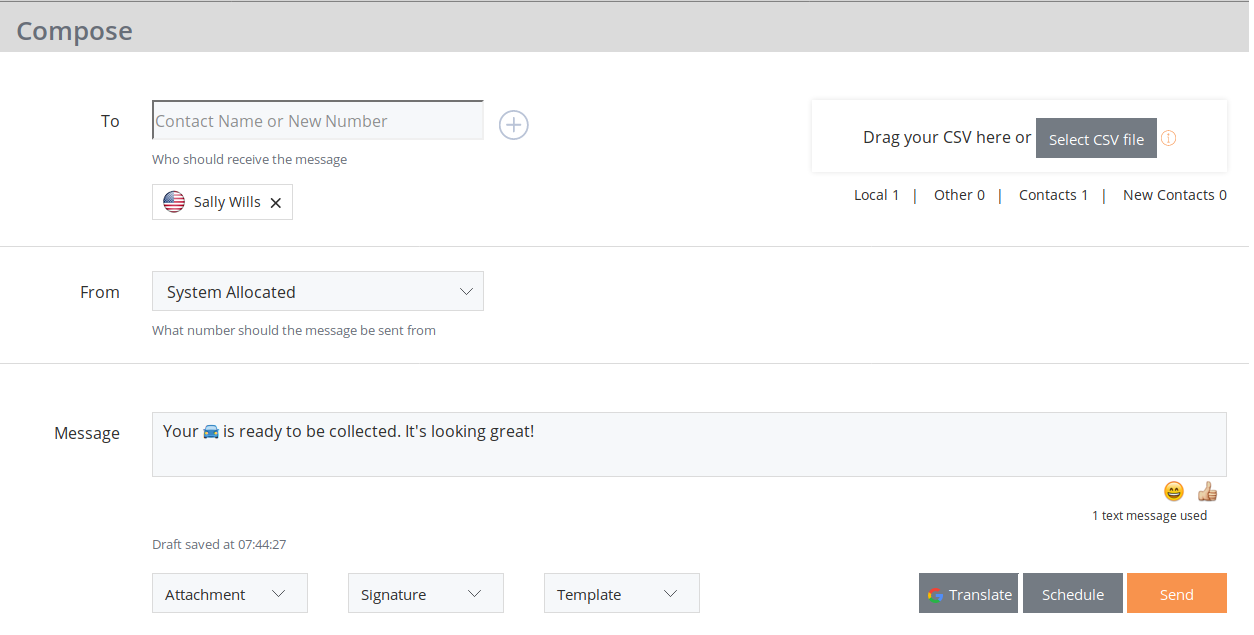


Your message will be sent using our global coverage of mobile networks. It usually works but sometimes your message may not get delivered. If it does not get delivered, check you have number correct, resend the message and if it is still not working then contact Support. You can see from the Status Pie Chart in the Sent Messages Section if there has been an issue in sending your message. Once you have mastered sending a single message you can even import a list of numbers from Microsoft Excel using the CSV upload.
For example:
john,6425484848,SALESTEAM
Your administrator may have configured the system to only allow messages to be sent to people in your Contacts. This can also be set so only the Company Administrator can add Contacts. This setting will apply to both the Web Portal and Email2SMS. These added levels of security aim to prevent system abuse. Contact your Company Administrator for more information if you are unable to access your desired Contacts or Groups.
Translation
Messages can be translated into other languages using our integration with Google Translate. Just click the 'Translate' button and choose your language.
Drafts
My A2P Message allows you to leave the compose screen and pick up where you left off by finding your message in the Drafts. A handy feature if you are waiting for confirmation on a location or date for a pre-planned event or meeting.
Emoji
Although we support the use of Emoji, understand that their use can have a huge impact on the number of parts (also known as ‘fragments’) required to send your message. More parts means increased costs, so if adding that little heart or smiley face increases your message from a 1 part message to a 2 part message, be aware that this doubles the cost of your message.
International Number Formats
All numbers used in My A2P Message must be in International Format.
International Number Format is a number format that includes the country, carrier and phone numbers without any dialling prefixes (eg 00 or 001) or special characters such as the plus symbol, eg. 6427000001 not +6427000001.
The following table shows how some numbers are displayed in international format.
Contact Metadata
A lot of people do not know what International Number Format is. When you enter a recipient number, My A2P Message looks up where we think it is likely to send, and will display a country flag. If you are only sending to your friends down the street or colleagues in another state then all your recipients will get the same flag. If you accidentally enter a wrong number, you'll be able to see this so you change it before your message is sent.
As well as the flag, you can click the contact to view or edit the details and can even add new numbers to a Group.
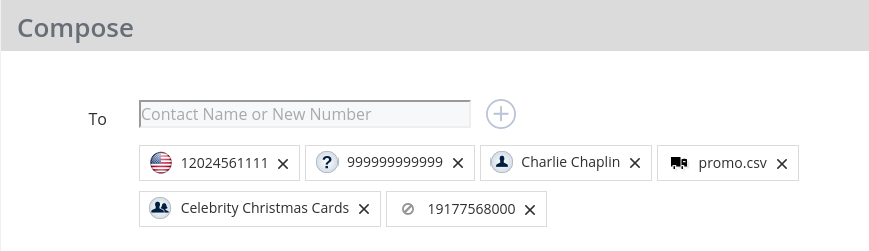
In the example above we can see that the message has been composed for:
- A number in the USA
- A number we think is invalid, so it probably won't be delivered
- A Contact called 'Charlie Chaplin'
- A Group of numbers uploaded in a CSV file 'promo.csv'
- A Group of Contacts called 'Celebrity Christmas Cards'
- A number that has been blocked